contact@synergytop.com
 +1 619-349-4911




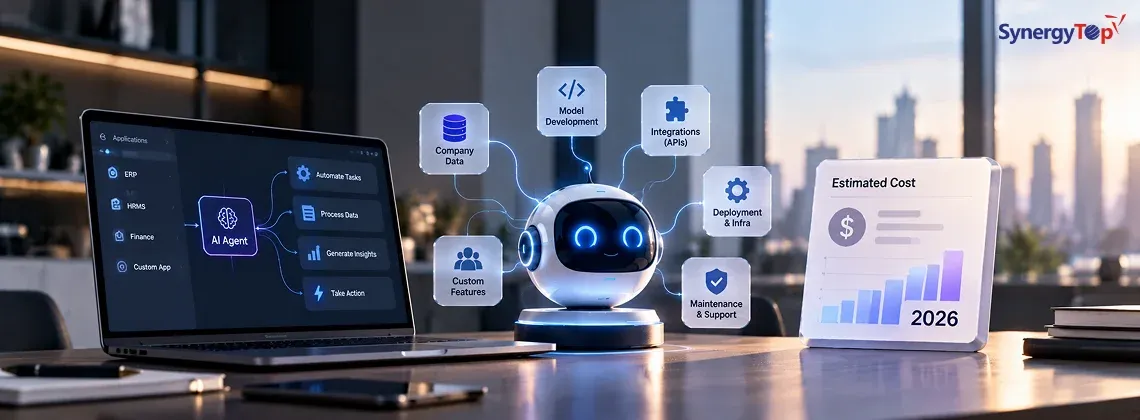


How Much Does an AI Agent Cost in 2026?
A support agent that classifies tickets is much simpler than an agent that retrieves customer data, checks company knowledge, updates a CRM, and initiates a business workflow.
For preliminary planning, AI agent projects can be grouped like this:
| AI Agent Type | Example | Preliminary Planning Estimate* |
| Focused AI Agent | One defined task | 10K–25K |
| Workflow Agent | Multi-step business process | 20K–50K |
| Integrated AI Agent | CRM, ERP, database or APIs | 40K–80K |
| Enterprise AI Agent | Multiple systems, actions, permissions and governance | 75K–150K+ |
These figures are preliminary planning estimates—not fixed quotations or guaranteed market prices. Actual cost depends on the workflow, integrations, data, autonomy, security, testing, and expected usage.
A focused project may include one AI workflow and a limited number of integrations. An enterprise implementation can require multiple integrations, role-based permissions, human approvals, monitoring, evaluation, and auditability.
Microsoft’s documentation on agent tools similarly shows that modern agents can go beyond a language model by using tools to interact with external systems, retrieve information, call APIs, and perform actions.
Have a Workflow in Mind?
Tell us what you want to automate, which systems are involved, and what actions the AI should perform.
Get My AI Agent Estimate →
Why Can One AI Agent Cost $20K and Another $100K+?
Five factors have the biggest impact.
1. Integrations
Connecting an agent to one database is very different from connecting it to:
CRM + ERP + Email + Documents + Internal APIs
Every additional integration can require authentication, data mapping, testing, error handling, and maintenance.
This is also why AI-agent development often overlaps with custom software development. The AI model may be only one component of a larger application that includes APIs, databases, business logic, authentication, dashboards, and third-party systems.
2. What the Agent Can Do
A useful way to think about autonomy is:
Answer → Recommend → Act
For example:
Answer: “Which customer contracts expire this month?”
Recommend: “These five accounts should be contacted first.”
Act: “Create follow-up tasks for their account managers.”
The more authority the agent has, the more attention needs to be given to permissions, testing, monitoring, and human oversight.
AWS’s Agentic AI design principles recommend matching agent autonomy with proportionate human oversight, particularly when actions can have meaningful business consequences.
3. Data Complexity
An agent working with clean database records is different from one that needs information from PDFs, emails, CRM records, spreadsheets, ERP data, and external APIs.
Preparing and connecting business data can become a significant part of the project.
For example, an agent may need to search a private knowledge base before answering an employee, retrieve structured information from a CRM, compare that information with ERP records, and then use an API to trigger the next step.
That architecture is considerably more complex than connecting a chatbot to a general-purpose AI model.
4. Security and Risk
If the agent can access sensitive information or change business data, the solution may need:
Authentication • Role-based permissions • Guardrails • Human approval • Audit logs • Monitoring
AWS’s enterprise agentic AI architecture treats security, governance, and observability as important requirements across production agent architectures rather than optional additions.
These controls become especially important when an AI system moves from answering questions to performing actions.
For example, an employee asking:
“Which invoices are overdue?”
is very different from telling an agent:
“Send reminders to every overdue customer and update their account status.”
The second workflow changes business data and communicates externally, so permissions, approval rules, logging, and failure handling become much more important.
5. Scale
An internal agent used by 30 employees has different requirements from a customer-facing agent processing thousands of requests.
Higher usage can affect model/API consumption, infrastructure, databases, monitoring, storage, and operating costs.
Scale can also affect architecture decisions.
A small internal agent may work with relatively simple infrastructure, while a customer-facing system may require queues, caching, rate limits, failover mechanisms, extensive monitoring, and more sophisticated cost controls.
What Type of AI Agent Could Your Business Build?
The best starting point isn’t:
“We want an AI agent.”
It is:
“Which business workflow do we want to improve?”
Here are three examples.
Sales Agent
CRM → Customer History → Analysis → Recommendation → Follow-Up Task
The agent could summarize an account, identify opportunities, recommend the next action, and prepare follow-up activity.
For example, instead of a salesperson manually reviewing account notes, previous conversations, open opportunities, and customer activity, an agent could collect the relevant information and prepare a recommended next step.
Customer Support Agent
Ticket → Customer Data → Knowledge Base → Suggested Response → Escalation
The agent could handle repetitive support work while sending complex or sensitive cases to employees.
A more advanced version could retrieve customer information, review previous tickets, search internal documentation, prepare an answer, and determine whether the request needs human escalation.
Finance or Operations Agent
Document/Event → ERP Data → Validation → Exception Detection → Human Approval → Action
This can help automate repetitive processes without giving AI unrestricted authority over critical decisions.
For example, an agent could extract information from an invoice, compare it against ERP records, identify discrepancies, and route exceptions to an employee before any final action occurs.
For a deeper explanation of how this type of software works, including autonomy, multi-agent systems, business applications, and implementation risks, read our guide to Agentic AI: Opportunities, Risks and Applications in Modern Software Systems.
Development Cost Isn’t the Total Cost
The initial development budget is only part of the investment.
A better way to evaluate an AI agent is:
Total Cost of Ownership = Build + Run + Maintain
Build includes development, integrations, testing, security, and deployment.
Run can include LLM/API usage, cloud infrastructure, databases, storage, and third-party services.
Maintain can include monitoring, evaluation, workflow changes, integration updates, and security improvements.
This matters because a cheap prototype isn’t necessarily a low-cost production solution.
A proof of concept may demonstrate that an AI model can successfully perform a task.
Production deployment asks a much harder question:
Can it perform that task reliably, securely, repeatedly, and at an acceptable operating cost?
Businesses should therefore consider the total cost of ownership rather than comparing AI-agent projects only by their initial development estimates.
Will an AI Agent Actually Pay for Itself?
This is often more important than the development price.
Suppose five employees each spend two hours per day on the same repetitive process.
5 employees × 2 hours = 10 hours/day
Using an illustrative loaded labor cost of $35/hour:
10 × $35 = $350/day
Across 20 working days:
Current workflow cost ≈ $7,000/month
This does not mean an AI agent will eliminate $7,000 in monthly labor cost.
Instead, it establishes the current cost of the workflow.
The business can then compare potential time savings and increased capacity against:
Development + Operating Costs + Maintenance + Human Oversight
For example, the AI agent may automate only the repetitive part of the process while employees continue handling exceptions, approvals, customer conversations, and higher-value decisions.
The resulting value may therefore come from a combination of:
Time saved + Faster processing + Increased capacity + Reduced repetitive work
The better question isn’t simply:
“How much will the AI agent cost?”
It is:
“Does this workflow create enough business value to justify automating it?”
That is the calculation businesses should make before investing heavily in agentic AI.
When Is an AI Agent Not Worth Building?
An AI agent isn’t automatically the right solution.
You may not need one when:
- the workflow can already be automated reliably with conventional software
- the required data is inaccessible or unreliable
- mistakes could have serious consequences without adequate controls
- there is no measurable business outcome
- the process is mostly deterministic and does not require AI reasoning
- a conventional API integration can solve the problem more reliably
Sometimes an API integration, traditional workflow automation, RAG assistant, or improvement to your existing software is the better investment.
If your primary concern is adding AI to software your business already uses, read our guide on how to integrate AI into existing business software without rebuilding everything.
This approach can make more sense when a business already has a functioning CRM, ERP, SaaS platform, internal application, or database and simply needs to add AI capabilities around the existing system.
What Would Your AI Agent Cost?
Building a production AI agent can require several capabilities working together:
AI engineering + Custom software + APIs + Business data + Cloud + System integration
SynergyTop works across these areas, including AI development, custom software development, custom applications, enterprise integrations, and workflow-oriented software.
The right starting point is not selecting an AI model.
It is defining the workflow.
Before estimating an AI-agent project, businesses should be able to answer questions such as:
What process are we trying to improve?
Which employees currently perform it?
Which systems does the process depend on?
What information should the AI be allowed to access?
Should the agent answer, recommend, or act?
Which actions require human approval?
How many people will use the system?
What measurable business result would make the project successful?
Those answers help determine whether the business needs a focused AI assistant, a workflow agent, an integrated AI agent, or a larger enterprise implementation.
You can also explore the SynergyTop Portfolio for examples of our broader custom software, SaaS, integration, mobile, and enterprise application work.
We don’t present unrelated portfolio projects as AI-agent case studies. However, they demonstrate the software engineering and integration capabilities that production AI-agent projects often require.
Have an AI Agent Idea?
Tell us the workflow you want to automate, the systems involved, approximate number of users, and what you want the AI to be allowed to do.
Frequently Asked Questions
1. How much does an AI agent cost in 2026?
A focused business AI agent may require an investment in the low tens of thousands of dollars, while integrated enterprise agents can reach $100,000 or more. The final cost depends on integrations, data, autonomy, security, testing, and scale.
2. How long does it take to build an AI agent?
A focused proof of concept may take several weeks. Production agents involving multiple systems, business workflows, permissions, and testing can require several months.
The timeline depends not only on the AI model but also on integrations, business logic, data preparation, security, testing, and deployment requirements.
3. Can an AI agent integrate with our CRM or ERP?
Potentially, yes. AI agents can interact with existing systems through APIs, databases, middleware, connectors, and other integration methods.
The exact approach depends on the CRM or ERP platform, available APIs, authentication requirements, data structure, and the actions the agent needs to perform.
If your CRM or ERP is already working well, it may also be more practical to integrate AI into the existing software rather than rebuild the underlying application.
4. What does an AI agent cost to maintain?
Ongoing costs can include model/API usage, cloud infrastructure, monitoring, evaluation, integration maintenance, databases, storage, security improvements, and workflow updates.
Actual costs depend heavily on usage and architecture.
An internal agent used occasionally by a small team can have very different operating requirements from a customer-facing agent handling thousands of requests.
5. Does every business need an AI agent?
No, Some workflows are better handled using traditional software automation, APIs, deterministic business rules, or a simpler RAG-based AI assistant.
An AI agent makes more sense when the workflow requires a combination of reasoning, contextual information, tools, system integrations, and controlled actions.
6. How do we get an accurate AI agent development estimate?
Start by documenting the workflow you want to automate, the systems involved, the data the agent needs, expected usage, and whether the agent should answer questions, make recommendations, or perform actions.
These details make it much easier to estimate the required architecture, integrations, development effort, security controls, and ongoing operating costs.