contact@synergytop.com
 +1 619-349-4911






Your CRM, ERP, SaaS platform, or internal business application may already work well. But now your customers, employees, or competitors are pushing AI into the conversation.
You may want an AI copilot inside your CRM, an assistant that searches for company knowledge, automated document processing, natural-language reporting, or an AI agent that handles repetitive workflows.
The concern is understandable:
Do you have to rebuild your existing software to add AI?
In many cases, no.
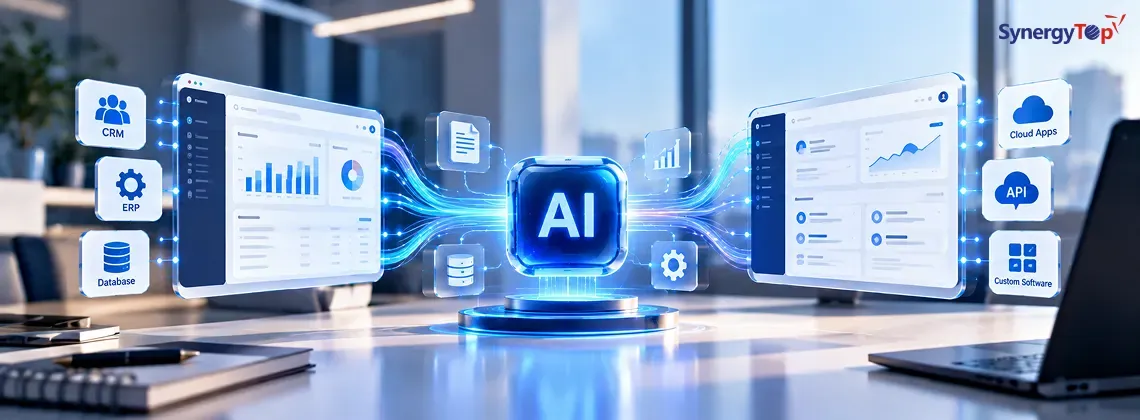
Modern AI capabilities can often be added alongside existing software through APIs, retrieval systems, microservices, and integration layers. AWS, for example, documents enterprise architectures where existing ERP, CRM, HRMS, supply-chain, workflow, and custom applications integrate bidirectionally with AI systems while remaining systems of record.
The better question is:
Which parts of your existing software should stay, and where can AI create enough value to justify integration?
Do You Need to Rebuild Your Software to Add AI?
If your existing application reliably handles its core business processes, rebuilding the entire platform solely to introduce AI may create unnecessary cost, migration risk, and disruption.
Instead, AI can often operate as a separate layer.
A simplified architecture could look like:
Existing CRM / ERP / SaaS
↓
Secure API or Integration Layer
↓
AI Service
↓
LLM / RAG / Machine Learning
↓
Response, Recommendation or Action
This also means your existing technology stack does not necessarily have to match your AI stack.
For example, an existing application built with Java, .NET, PHP, Laravel, or Node.js could potentially communicate with a Python/FastAPI AI service through APIs.
AWS identifies REST APIs, database connectors, message queues, GraphQL, SOAP for legacy systems, webhooks, and event-streaming platforms among the integration approaches organizations can evaluate for generative AI workloads.
The objective is not to force AI into every part of your application.
It is to add the right AI capability without destabilizing the software that already runs your business.
4 Ways to Integrate AI Into Existing Software
There isn’t one universal AI integration architecture. The right approach depends on your use case, data, existing application, and required level of automation.
1. AI API Integration
For focused AI functionality, an API integration can be one of the simplest approaches.
For example:
Support Ticket → AI Service → Summary + Suggested Response
This can support features such as:
- summarization
- classification
- information extraction
- content generation
- sentiment analysis
- translation
The existing application remains responsible for its normal workflows while the AI service handles a specific task.
2. Connect AI to Business Data With RAG
What if AI needs to answer questions based on your own information?
For example:
“What does our enterprise contract say about early cancellation?”
or:
“Which troubleshooting procedure applies to this equipment?”
A general-purpose LLM may not have access to the latest information in your company.
Retrieval-Augmented Generation (RAG) can retrieve relevant information from approved company sources and provide it to the model when answering a question.
The architecture may look like:
Existing Application → AI Assistant → Retrieval Layer → Company Knowledge → LLM → Grounded Response
This can be useful for internal knowledge assistants, support tools, document search, and other applications that depend on proprietary information.
3. Add an AI Copilot or Microservice
Your employees may not need another standalone AI application.
They may need AI inside the software they already use.
Suppose a salesperson opens a customer record and sees an AI Copilot panel.
They ask:
“Summarize this customer’s recent activity and suggest what I should discuss during the next call.”
The AI could use information from the customer record, approved business data, and relevant company knowledge to provide contextual assistance.
The existing CRM stays in place.
The AI capability operates through a separate service.
This separation can also make it easier to update or replace AI components later without rewriting the core application.
4. Connect AI Agents to Business Workflows
The most advanced integration happens when AI moves beyond answering questions and begins interacting with other business systems.
For example:
“Find customers whose contracts expire in the next 60 days and prepare follow-up tasks for their account managers.”
The workflow might become:
Retrieve → Analyze → Recommend → Approve → Act
AWS describes existing enterprise applications as systems that can expose business functions to AI agents, allowing controlled access to business data and workflows while the underlying CRM, ERP, or other application remains the authoritative system.
For a deeper explanation of this model, see SynergyTop’s guide to Agentic AI and its applications in modern software systems.
What Can AI Add to the Software You Already Have?
Start with the business problem—not the AI technology.
| Existing Software | Potential AI Capability |
| CRM | Customer summaries, lead scoring, sales copilot |
| ERP | Natural-language queries, anomaly detection |
| Customer Support | Ticket classification, summaries, response suggestions |
| SaaS Platform | Embedded AI copilot |
| Document System | RAG-powered knowledge assistant |
| Inventory System | Forecasting and anomaly detection |
| HRMS | Employee knowledge assistant |
| Operations Platform | Alerts, analysis and recommendations |
| Reporting System | Natural-language analytics |
| Workflow Software | AI-assisted automation |
For example, instead of asking:
“How can we use generative AI?”
ask:
“Our support team spends three hours each day manually categorizing tickets. Can AI reduce that work without replacing our support platform?”
That question has a measurable business outcome.
It also makes it much easier to determine whether AI integration is worth the investment.
A Safer AI Rollout: Read → Recommend → Act
Giving AI unrestricted control over an existing business system on day one is rarely necessary.
A more controlled approach is to expand AI’s permissions as the use case proves itself.
Stage 1 — Read
AI can retrieve approved information but cannot change business data.
“Show me orders delayed by more than five days.”
Stage 2 — Recommend
AI analyzes the information and recommends what a user should do.
“These customers should be contacted because their orders are delayed.”
The employee remains in control.
Stage 3 — Act
Once the workflow is sufficiently tested, AI may be allowed to perform specific approved actions.
“Create follow-up tasks for these customers.”
Sensitive actions can still require human approval.
This creates a practical progression:
Read → Recommend → Act
instead of moving directly from:
No AI → Autonomous AI
For organizations exploring AI agents, this human-in-the-loop approach can also reduce the risk associated with incorrect or unintended actions.
Should You Integrate AI, Modernize Part of the Software, or Rebuild?
Not every existing application is equally ready for AI.
Use the condition of the current software to guide the decision.
| Current Situation | Likely Direction |
| Core application works reliably | Integrate AI |
| APIs and clean data are available | Integrate AI |
| Backend works but parts are outdated | Integrate + selectively modernize |
| APIs are missing | Build integration layer / modernize selected components |
| Technical debt creates major limitations | Partial modernization |
| Security or scalability is fundamentally inadequate | Evaluate deeper modernization |
| Core platform no longer meets business needs | Consider rebuild |
The important point is that the decision does not have to be binary.
A company may be able to:
Keep 80% → Modernize 20% → Add AI
instead of replacing everything.
For example, the database, user accounts, business logic, and established workflows might remain unchanged while a secure API layer and AI service are introduced around them.
SynergyTop has worked on application modernization and system-integration projects where existing business systems needed to evolve rather than simply be discarded. Our ERP case studies include legacy modernization and Oracle EBS integration work.
That project should not be confused with an AI integration case study. However, it demonstrates an important capability for this type of work: understanding existing business systems and integrating new technology around them without assuming that everything must be rebuilt.
What Determines the Complexity of AI Integration?
Instead of publishing a generic AI integration price that may not reflect your software, evaluate the factors that actually determine implementation effort.
Your Existing Architecture
Is the application monolithic or modular? Are APIs already available? Is documentation current?
Data Accessibility
Does AI need information from one database or several systems?
Integration Requirements
Does it need to connect with CRM, ERP, SharePoint, internal APIs, or third-party applications?
AI Capability
There is a substantial difference between:
Summarize this text
and:
Analyze this account and update our CRM.
Security and Permissions
Does every user have the same access, or must AI respect departmental, role-based, or record-level permissions?
Required Actions
Read-only AI is generally simpler than AI that can modify production data or trigger workflows.
Scale
An internal feature for 25 employees has different performance and infrastructure requirements from a customer-facing AI feature serving thousands of users.
These factors are why an AI readiness assessment is usually more useful than assigning a price based solely on the phrase “AI integration.”
Example: Adding an AI Sales Copilot Without Replacing the CRM
Consider a company with an established custom CRM.
Salespeople use it every day, and its customer management workflows already work.
But before contacting a customer, representatives manually review:
Previous conversations + sales notes + orders + support history + account information.
Management wants AI to reduce that work.
One option would be rebuilding the CRM around AI.
But if the CRM already works, another approach is:
Existing CRM
↓
Secure Integration/API
↓
AI Service
↓
Approved CRM Data + Company Knowledge
↓
AI Sales Copilot
The salesperson could ask:
“Summarize this customer’s recent activity and tell me what I should discuss on the next call.”
The first version could remain read-only.
Later, the AI might recommend:
“Schedule a renewal discussion because this contract expires next month.”
And once the workflow has been validated, the system could potentially allow:
“Create a follow-up task for Friday.”
Again:
Read → Recommend → Act
The company gains new AI functionality without replacing the CRM that employees already use.
This is an illustrative architecture, not a SynergyTop client case study.
What About Security and Company Data?
AI integration should not bypass the security model of your existing application.
Depending on the system, the architecture may need:
- authentication
- role-based permissions
- encryption
- API authorization
- data isolation
- audit logging
- monitoring
- human approval for sensitive actions
Provider-level data controls also matter.
OpenAI states that it does not use data from its API platform and business offerings to train its models by default. Its API documentation also explains that some API features may retain application state and that abuse-monitoring logs are subject to defined retention controls.
Microsoft states that prompts, completions, embeddings, and training data used with Models sold by Azure are not used to train generative AI foundation models without the customer’s permission or instruction.
These policies are useful, but they do not make every implementation automatically secure.
Your application still needs to determine:
Who can access the AI?
What information can each user retrieve?
What data is sent to the model?
Which actions can AI perform?
When is human approval required?
Security therefore needs to be designed across the complete AI integration—not assumed based on the model alone.
Is Your Existing Software AI-Ready?
You don’t need to prepare a lengthy technical specification to find out.
Start with five questions.
1. What software do you currently have?
CRM, ERP, SaaS platform, internal application, or legacy software?
2. What do you want AI to do?
Answer questions, analyze data, generate content, recommend actions, or automate workflows?
3. Where does the required data live?
Database, CRM, ERP, documents, SharePoint, APIs, or several systems?
4. Can the software expose data or functionality through APIs?
If not, an integration layer or selective modernization may be required.
5. Does AI need to read information or change it?
This can materially change the architecture, security requirements, and implementation effort.
Frequently Asked Questions
1. Can AI be integrated into legacy software?
Often, yes. Depending on the architecture, AI may be connected through APIs, middleware, database connectors, events, or a separate microservice. Very old or tightly coupled applications may require selective modernization first.
2. Do we have to change our existing technology stack?
Not necessarily. Your existing Java, .NET, PHP, Node.js, or other application can potentially communicate with an AI service built using another technology through APIs or other integration mechanisms.
3. Can AI integrate with our existing CRM or ERP?
Potentially. CRM and ERP systems can expose business data and functions through APIs or other integration mechanisms. What AI can safely access or modify depends on the platform, permissions, available interfaces, and use case.
4. Is it safe to connect AI with business data?
It can be when the architecture implements appropriate authentication, authorization, encryption, data controls, monitoring, and governance. Security should be evaluated across the entire integration, not just the chosen AI model.
5. Should we integrate AI or rebuild our software?
If your core application still performs its business functions reliably, integration or selective modernization may be more practical than a full rebuild. Rebuilding becomes more relevant when the underlying architecture, security, scalability, or technical debt prevents the platform from supporting future requirements.